

Lesson 5: Status Codes & Exception Handling
Learn how to correctly update delivery statuses, manage exceptions, and maintain clean operational visibility.
Why This Matters
Dispatch and operations rely on accurate status updates to understand what is happening in the field. Incorrect statuses create customer confusion, failed follow-ups, billing problems, and operational blind spots.
Step 1: Open Status Codes
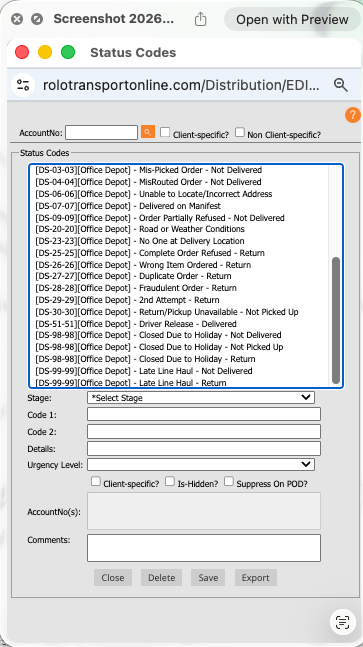
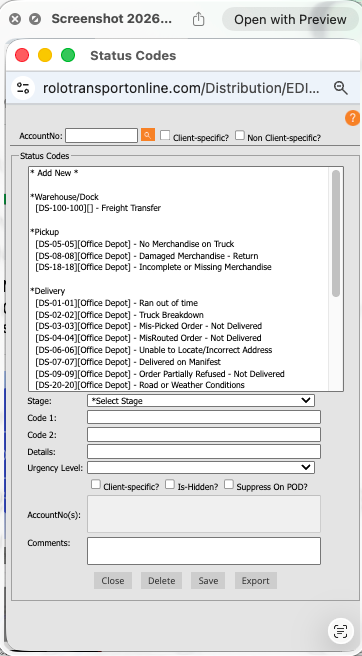
This section controls pickup statuses, delivery statuses, and operational exception codes.
Step 2: Understand Status Code Types
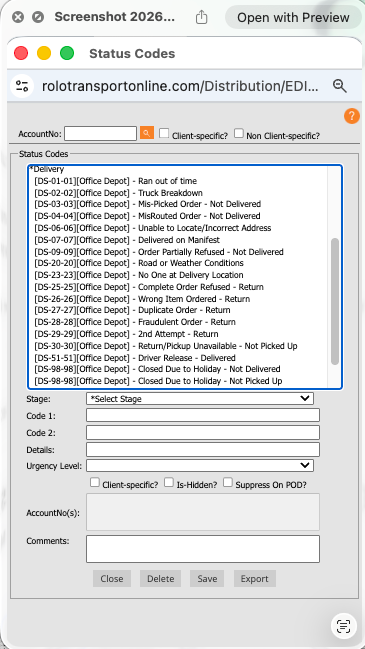
Xcelerator separates statuses into operational categories.
- Pickup Codes → pickup activity and pickup issues
- Delivery Codes → completed deliveries and delivery confirmations
- Exception Codes → failed deliveries, delays, refusals, or operational problems
Step 3: Use the Correct Status
Always choose the status that accurately reflects what actually happened in the field.
- Delivered → order successfully delivered
- Attempted → driver attempted but could not complete delivery
- Refused → customer rejected the delivery
- Unable to Access → gate, building, or location issue prevented delivery
- Cancelled → order cancelled before completion
Never select a status simply to close an order faster. Statuses must reflect real operational activity.
Step 4: Add Clear Operational Notes
Status codes alone are not enough. Notes explain what happened and support follow-up actions.
- Be specific
- Explain the issue clearly
- Avoid vague wording
- Document customer communication when relevant
Customer not home. Driver called twice with no answer. Front office unable to accept package.
Step 5: Handle Exceptions Properly
Exception handling is one of the most important operational responsibilities.
- Do not mark undelivered orders as complete
- Use the correct exception code
- Notify dispatch or management if escalation is needed
- Ensure follow-up responsibility is clear
- Protect delivery accuracy and customer visibility
Best Practices
- Prioritize accuracy over speed
- Use consistent status logic across all dispatchers
- Keep operational notes professional
- Document customer-impacting issues clearly
- Review exceptions daily
Common Mistakes
- Marking deliveries complete when not delivered
- Using incorrect exception codes
- Skipping notes entirely
- Using vague language like “issue” or “problem”
- Failing to escalate operational exceptions
Success Check
You should now be able to:
- Navigate to Status Codes
- Understand pickup, delivery, and exception statuses
- Select the correct operational status
- Write clear operational notes
- Handle delivery exceptions correctly
- Maintain clean operational visibility