

ROLO Dispatch Training • Lesson 5
Lesson 5: Status Codes & Exception Handling
Learn how to correctly update delivery status and handle problems the right way.
If the status is wrong, the delivery record is wrong. Status codes control visibility, customer updates, reporting, follow-up, and billing accuracy.
Problem Happens → Confirm Facts → Select Correct Status → Add Clear Notes → Attach Proof → Notify Dispatch/Supervisor
Step 1: Open Status Codes
Navigation → Administration → Status Codes
This screen controls pickup, delivery, and exception updates. These codes must be used consistently so dispatch, customers, and internal teams understand what happened.
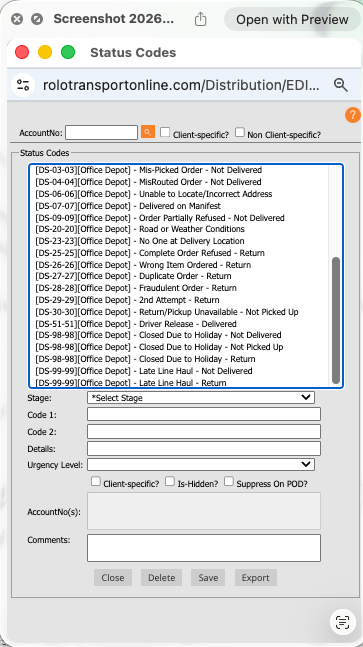
Pickup Status Codes
Step 2: Understand Status Code Types
There are three main types of status codes:
- Pickup Codes → used for pickup activity or pickup issues
- Delivery Codes → used when delivery activity is completed correctly
- Exception Codes → used when something prevents normal completion
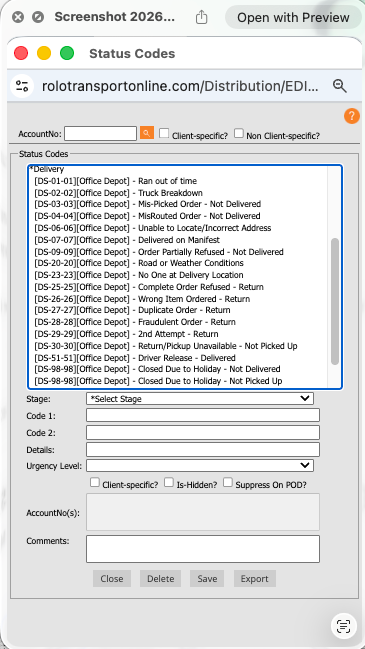
Delivery Status Codes
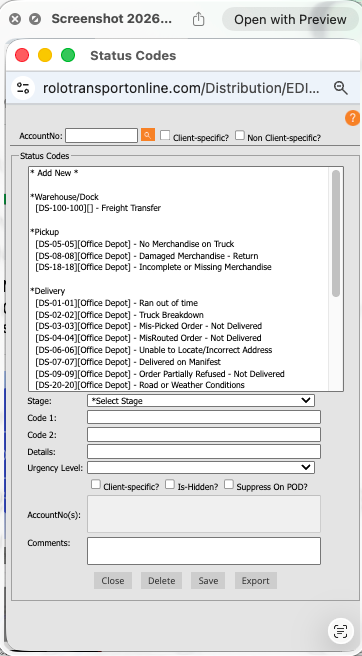
Exception Status Codes
Watch This Example: Exception / Status Workflow
Watch this walkthrough showing how delivery issues and status updates should be handled inside MobileTek.
Focus on:
- How the correct status is selected
- How exceptions are documented
- Why drivers should not guess
- When dispatch must be contacted
Watch This Example: Delivery Problem Handling
Watch this walkthrough showing how delivery problems should be documented and escalated.
Step 3: Use the Correct Code
Always match the status code to what actually happened.
- Delivered = item was successfully delivered
- Attempted = driver attempted delivery but could not complete it
- Refused = customer rejected the delivery
- Unable to access = location, gate, building, or access problem
- Exception = something prevented normal pickup/delivery completion
ROLO Standard:
Never guess or choose a status code just to close the job. Accuracy is more important than speed.
Never guess or choose a status code just to close the job. Accuracy is more important than speed.
Step 4: Add Clear Notes
- Explain what happened
- Use specific facts
- Include time, contact attempts, location issue, or customer response when relevant
- Avoid vague notes like “issue,” “problem,” or “no answer” without detail
Bad Note:
“No answer.”
Good Note:
“Arrived at 2:14 PM. Called customer twice with no answer. Front gate locked. Dispatch notified.”
Step 5: Handle Exceptions Properly
- Do not mark complete if delivery did not happen
- Use the correct exception code
- Add clear notes
- Attach photos if needed
- Notify dispatch or supervisor if the stop cannot be completed
- Make sure follow-up instructions are clear
Watch This Example: Streamlining Order Status with Barcode Manager
Watch this Xcelerator workflow showing how barcode tools can help streamline order status updates.
Best Practices
- Be accurate, not just fast
- Use consistent codes across all drivers
- Keep notes clear and professional
- Think: “Would dispatch, customer service, or the customer understand this?”
- Confirm failed deliveries and exceptions before ending the day
Common Mistakes
- Marking deliveries complete when they are not complete
- Using the wrong code
- Skipping notes
- Using vague language
- Waiting too long to notify dispatch
- Failing to document photos or proof when needed
What Happens If You Don’t:
Incorrect statuses can create customer complaints, billing disputes, failed delivery investigations, dispatch confusion, and inaccurate performance reporting.
Incorrect statuses can create customer complaints, billing disputes, failed delivery investigations, dispatch confusion, and inaccurate performance reporting.
Do it now: Review one recent delivery and confirm the correct status code, notes, and proof were used.
Success Check
- Identify pickup, delivery, and exception codes
- Select the correct code based on what happened
- Write clear delivery notes
- Know when to escalate to dispatch/supervisor
- Avoid closing jobs incorrectly
Accurate status updates build trust, prevent confusion, and keep operations running clean.