
Lesson 6: Arrive at the Stop
Start the delivery process correctly by verifying the stop and activating ARRIVE only when you are physically at the delivery location.
Why This Matters
Tapping ARRIVE starts the official stop record in MobileTek and confirms that you are at the delivery location. This affects GPS tracking, dispatch visibility, customer updates, and delivery records.
Look at This
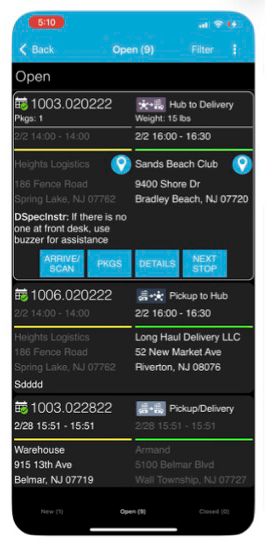
Do not tap ARRIVE early just to move faster. ARRIVE should only be activated once you are parked at the correct stop.
Do These Steps
- Drive to the correct delivery location.
- Park safely before using the app.
- Open the stop inside MobileTek.
- Verify the address before exiting the vehicle.
- Confirm you are at the correct stop.
- Tap ARRIVE.
- Wait for the stop to activate before beginning delivery.
Important:
Do not tap ARRIVE while driving, before parking, or before confirming the delivery address.
Watch This Example: Arrive at the Stop
Watch this walkthrough showing how to properly open the stop, verify the address, and tap ARRIVE inside MobileTek.
Focus on:
- How to open the stop correctly
- How to verify the delivery address
- When to tap ARRIVE
- How the stop activates inside MobileTek
Do It Now:
- Open your current stop
- Verify the delivery address
- Confirm you are at the correct location
- Tap ARRIVE only after parking safely
Best Practices
- Review the stop before exiting the vehicle
- Check building numbers carefully
- Confirm apartment or suite details
- Park safely before interacting with the app
- Verify the stop matches the package before delivery
Common Mistakes
- Tapping ARRIVE before reaching the location
- Tapping ARRIVE while still driving
- Forgetting to tap ARRIVE
- Going to the wrong address
- Starting the wrong stop
- Not verifying the stop before delivery
What Happens If You Don’t:
Incorrect ARRIVE actions can create bad GPS records, failed deliveries, customer complaints, dispatch confusion, and delivery tracking issues.
Success Check
You should now:
- Know when to tap ARRIVE
- Understand how to verify the stop address
- Know how to properly begin a delivery stop
- Understand why ARRIVE timing matters
- Be ready to continue the delivery workflow correctly
Need Help?
If the address looks incorrect or you believe you are at the wrong stop, contact dispatch before continuing.