

“`html
ROLO MobileTek Driver Training • Lesson 3 of 9
Lesson 3: Open Your Stops
Review your active stop list before driving so you understand the route, package count, and delivery order.
Follow the stop order shown in MobileTek unless dispatch gives different instructions.
Why This Matters
Open Orders shows your active route stops. This is where you confirm what you are delivering, where you are going, and what stop should be handled first.
Open Orders → Review Stops → Select First Stop → Review Details → Begin Route
Look at This
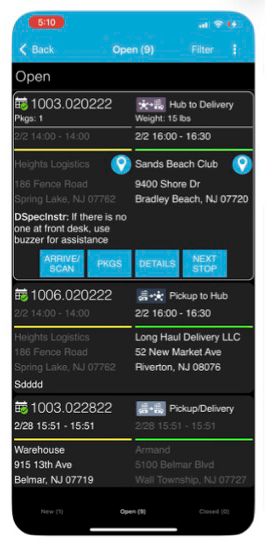
Open Orders screen
Do These Steps
- Tap Open Orders.
- Review the stop list carefully.
- Confirm stops appear in the expected delivery order.
- Check for shared stops or multiple packages at the same location.
- Select the first stop.
- Review the address, package details, and delivery notes before driving.
ROLO Standard:
Do not skip around the route or choose your own stop order unless dispatch tells you to.
Do not skip around the route or choose your own stop order unless dispatch tells you to.
Watch This Example: Search by Scan
Watch how scan search can help locate packages or stops quickly.
Watch This Example: Shared Stops Logic
Watch how shared stops work when multiple packages or orders belong to one delivery location.
Do It Now:
- Open your active stops
- Select the first stop
- Review address and package details
- Confirm there are no missing or unexpected stops
Common Mistakes
- Skipping around the stop list
- Not reviewing stop details before driving
- Jumping ahead to later stops
- Ignoring shared stop information
- Missing packages because stops were not reviewed carefully
- Leaving before confirming the stop list looks correct
What Happens If You Don’t:
Incorrect stop handling can create missed deliveries, routing issues, delivery delays, package confusion, and customer complaints.
Success Check
You should now:
- Know how to open your stop list
- Understand how stops are organized
- Know how to select and review your first stop
- Understand why shared stops must be reviewed carefully
- Be ready to begin the route in the correct order
Need Help?
If stops appear missing, out of order, duplicated, or incomplete, contact dispatch before beginning deliveries.
Start with the first stop. Stay in order. Contact dispatch if something looks wrong.
Continue to Lesson 4 →
“`